How To Update Wireless Network Adapter. Besides, if you cannot get access to network, you can also use driver talent to install usb wireless lan card driver on an available computer. Want to know how to update wifi network adapter drivers?
FIX WiFi wont Turn On, Wireless Networks Not Available from www.wintips.org
Download your wifi driver from your device manufacturer website. This video will show you how to update network adapter drivers on a windows 10 pc or laptop. Select, search automatically for drivers.
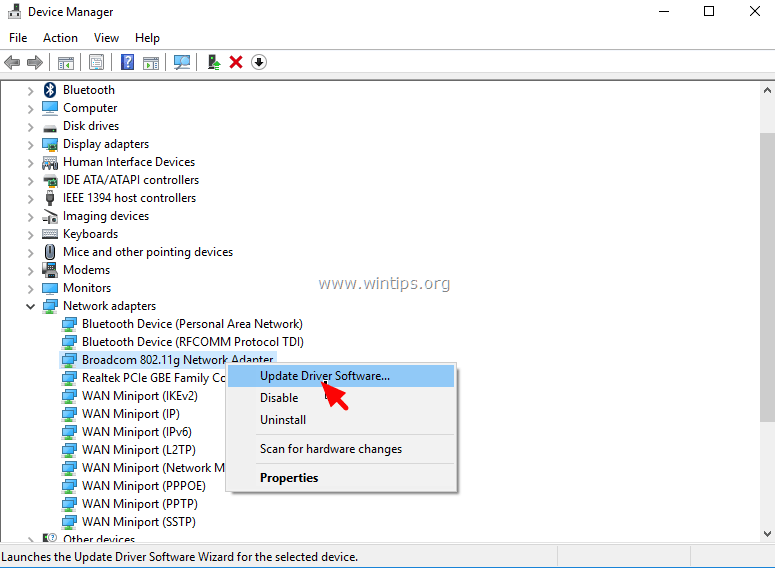
Update Your Wifi Driver With Device Manager.
Update your wifi driver automatically. To use it follow these steps: Update the ethernet network card in windows 10.
In The Event Of An Update, Select Update.
Device manager is the windows tool that will help you update all the latest device drivers on your windows pc. How to change from 2.4ghz to 5ghz wireless network adapter in windows 10/8/7 [tutorial]wireless adapters can run in 2.4 ghz or 5 ghz, which also refers to as. Reboot your pc after installing the updated drivers.
Double Click It To Expand And See The Wireless Network Adapter.
This video will show you how to update network adapter drivers on a windows 10 pc or laptop. In the newly opened tab, go to the network adapters. Downloading the latest driver releases helps resolve driver conflicts and improve your computer's stability and performance.
Click On It And Then You.
In this tutorial we are going to use the windows 10 operating system because it is the most widespread. The adapter should be connected to your windows 10 device. This tool identifies your adapter.
Here Are The Driver Update Websites For Some Frequently Used Wireless (Wifi) Cards:
Else, you can use the best driver updater software to automatically update the drivers. Wait for the process to finish. Windows will then install the drivers.
Amazon Usb C To Hdmi Adapter . Lemorele usb c to dual hdmi adapter, type c to hdmi converter,hdmi dual monitor adapter 4k @60hz for macbook/macbook pro 2020/2019/2018,macbook air,chromebook pixel,surface book 2 $29.99 sold by lemorele direct and ships from amazon fulfillment. 3.8 out of 5 stars. USB C Hub HDMI Adapter Only 19.88 (Reg. 38) from www.raininghotcoupons.com Usb c to hdmi adapter,usb c adapter macbook pro accessories jzv hdmi to usb c with 4k hdmi usb 3.0 port usb c charging port usb hub usbc hdmi converter compatible for macbook pro macbook air ipad pro. Cablecreation usb c to hdmi cable, 3ft usb type c to 4k hdmi cable adapter for home office, compatible with macbook pro/ipad pro 2020 2019, surface book 2, dell xps 15, samsung s10, s9 plus, (not compatible with xperia series) 0.9m/black. 4.3 out of 5 stars.
Can You Use A Phone As An Xbox Controller . In this article we discuss the main games that are compatible with the xbox controller. To do so, you need the xbox one smartglass app, or if you have a windows 10 phone, the xbox app works as well. (How to Use & Connect) Microsoft Xbox Controller for PC from www.techinpost.com In this article we discuss the main games that are compatible with the xbox controller. You don't need to fight over controllers anymore, just use xbstream app, and enjoy the game with your phone! To do so, you need the xbox one smartglass app, or if you have a windows 10 phone, the xbox app works as well.
Xbox One Headset Adapter Box . Click on that and youll see sliders for headset volume, the headset chat. On supported consoles, some voice chat features may require xbox game pass ultimate or xbox live gold (memberships sold separately). Stereo Headset Headphone Audio Game Adapter For Microsoft from www.ebay.com For use with xbox x|s, xbox one and windows 10 devices. If you plug in your headset, press the xbox guide button, then scroll all the way over to the left (to your profile picture), you should now see a section called audio right above settings. Plug your favorite compatible headset into the xbox one stereo headset adapter and hear the action just the way you like it.


Comments
Post a Comment